
How Gmail Sorts Messages Into the Spam FolderGmail
Checking and Removing Messages Classified as Spam
Gmail uses a spam filter by default. Incoming messages that are identified as problematic are automatically processed as “Spam.”
However, legitimate messages can sometimes be classified as spam by mistake, while unwanted messages can occasionally bypass the filter.
This section explains how to report a message as spam and how to remove a legitimate message that was mistakenly classified as spam.
Checking Messages Sent to Spam
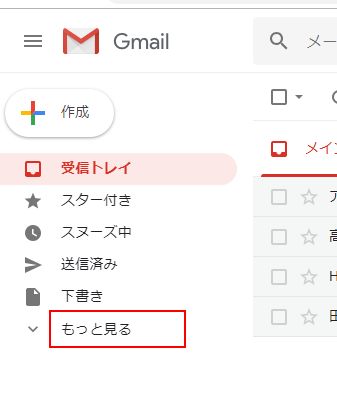
Incoming messages normally appear in the inbox unless filters are configured, but messages identified as spam do not appear in the inbox. To check them, click “More” on the left side of the Gmail screen.
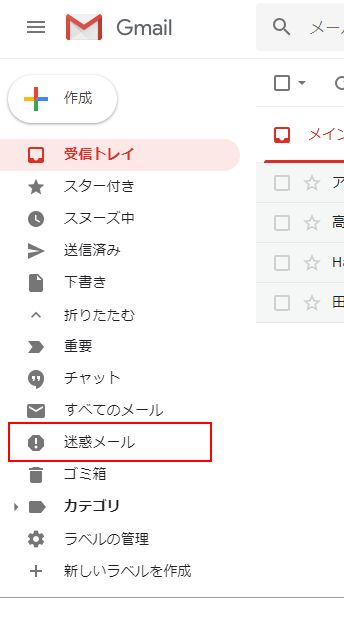
The “Spam” label will appear in the list of labels on the left side. Click it.
Removing a Message From Spam
Some messages may have been placed in Spam by mistake. You can remove the spam classification from these messages.
Open Spam and select the message you want to restore. Several icons will appear above the message list; click “Not spam.”
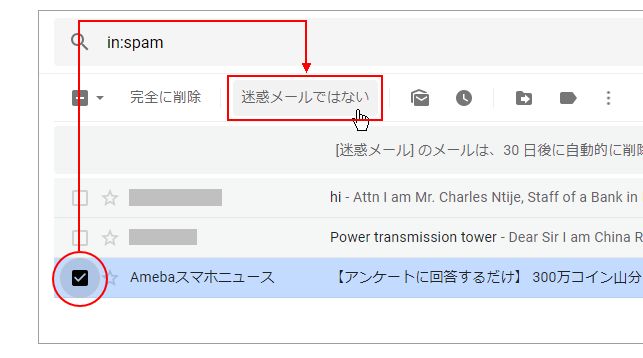
The spam label will be removed from the message and it will no longer appear in the Spam folder.
Checking Why a Message Was Classified as Spam
When you open a message in Spam, Gmail may display the reason it was classified as spam. For example, a message may show a notice such as “Many messages from (domain name) were identified as spam in the past.”
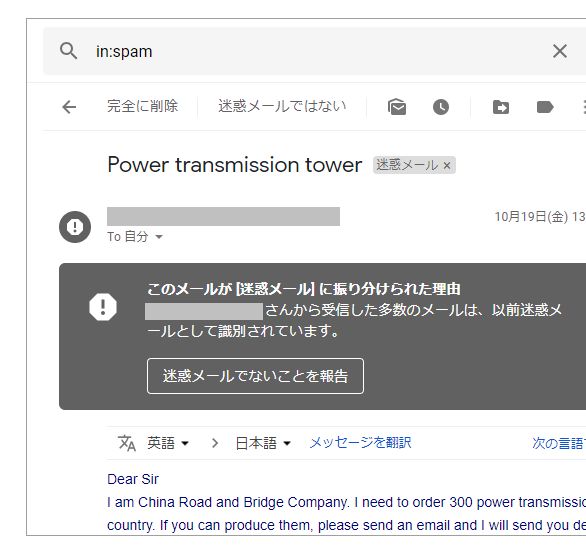
If an important email was mistakenly classified as spam, check the reason shown by Gmail.
Reference SiteChecking and Removing Messages Classified as Spam
Contact Us
Over 30,000 consultations / Over 19,000 completed engagements. To date, we have supported consultations and requests involving analysis outsourcing, statistical processing, questionnaire surveys, marketing support, and more. Our experienced consultants carefully listen to your needs so that we can provide the right support. We offer prompt and accurate work at reasonable, accessible rates and are committed to delivering dependable results. Stat Agent team members across Japan will take responsibility for supporting you.
*We provide the profile of the person responsible for your project when you apply.
For outsourced analysis and statistical processing, choose Stat Agent.
*When order volume is high, it may be difficult to reach us by phone.
We apologize for the inconvenience. We respond in order of receipt, so if your matter is urgent, please contact us by
